



Top 10 WhatsApp Tricks 2026 for Beginners in India WhatsApp has become one of the most powerful communication tools in India. From chatting with friends to running businesses, attending classes, and sharing important documents, WhatsApp plays a major role in everyday life.
However, most users still use only basic features like sending messages, photos, or voice notes. What many people don’t realize is that WhatsApp offers several hidden and advanced features that can completely transform how you use the app.
These features are designed to improve privacy, increase productivity, and make communication faster and smarter.
According to official updates from WhatsApp, new features like chat lock, message editing, and multi-device support are designed to improve user privacy and overall experience.
What Are WhatsApp Tricks
WhatsApp tricks are hidden features that help users improve privacy, speed, and efficiency while using the app.
Top 10 WhatsApp Tricks 2026 for Beginners in India
Top 10 WhatsApp Tricks 2026 for Beginners in India
- Lock Individual Chats for Maximum Privacy
- Send Messages Without Saving Contact Numbers
- Use WhatsApp on Multiple Devices
- Edit Sent Messages Easily
- Send HD Photos and Videos
- Pin Important Chats for Quick Access
- Use Voice Typing for Faster Messaging
- Enable Disappearing Messages for Privacy
- Create Polls in WhatsApp Groups
- Track Who Viewed Your Status
1. Lock Individual Chats for Maximum Privacy
Privacy is one of the biggest concerns for users today. Many people share their phones with family members, friends, or colleagues, which can make personal chats vulnerable.
WhatsApp’s Chat Lock feature allows you to secure specific conversations instead of locking the entire app.
How to use:
- Open the chat
- Tap on the contact name
- Select “Chat Lock”
- Enable fingerprint or face lock
Why it’s useful:
This feature is especially helpful for users who want to keep personal or sensitive conversations private without restricting access to the entire app.
Real-life example:
If you share your phone at home, you can lock private chats while keeping other chats accessible.
Pro Tip:
Use chat lock for banking messages, personal conversations, or confidential work discussions.
2. Send Messages Without Saving Contact Numbers
Saving numbers for one-time conversations can clutter your contact list.
You can send messages directly without saving the number using a simple link format.
How it works:
Type this in your browser:
wa.me/91XXXXXXXXXX
Replace the Xs with the phone number including country code.
Benefits:
- No need to save unknown contacts
- Faster communication
- Cleaner contact list
Real-life use:
Useful when contacting delivery agents, customer support, or temporary clients.
Pro Tip:
Bookmark this method if you frequently send messages to new numbers.
3. Use WhatsApp on Multiple Devices
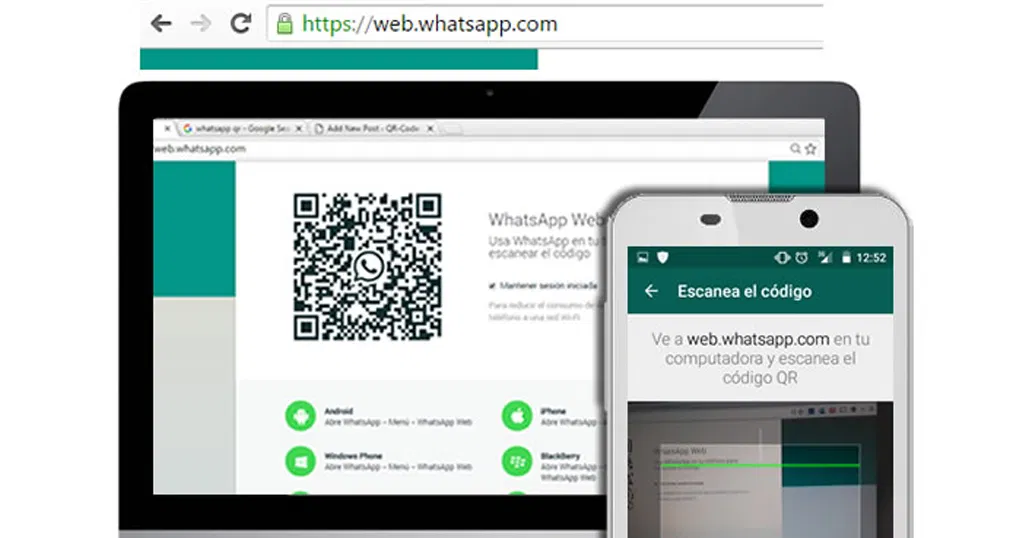
WhatsApp now supports multi-device usage, allowing you to access your account on multiple devices simultaneously.
Supported devices:
- Laptop
- Tablet
- Secondary smartphone
How to connect:
- Go to Linked Devices
- Scan QR code
Benefits:
- Work from desktop easily
- No need to keep phone connected
- Seamless synchronization
Real-life example:
Students can use WhatsApp on laptops for notes, while professionals can manage chats during work.
Pro Tip:
Always log out from public computers to maintain security.
4. Edit Sent Messages to Fix Mistakes
Typing mistakes happen frequently, especially during fast conversations.
WhatsApp now allows users to edit messages after sending them.
How to edit:
- Long press the message
- Tap “Edit”
- Update the text
Benefits:
- Fix spelling errors
- Correct wrong information
- Maintain clarity in chats
Real-life use:
Helpful in professional communication where accuracy matters.
Pro Tip:
Always double-check edited messages to avoid confusion.
5. Send HD Photos and Videos Without Losing Quality
Earlier, WhatsApp compressed media files, reducing quality. Now, you can send HD images and videos.
Steps:
- Select photo or video
- Tap the HD option before sending
Benefits:
- Better clarity
- Useful for documents
- Ideal for content sharing
Real-life example:
Students can send clear notes, and professionals can share presentations.
Pro Tip:
Use HD mode only when necessary to save mobile data.
6. Pin Important Chats for Quick Access
When you have many chats, important conversations can get lost.
WhatsApp allows you to pin chats at the top.
How:
- Long press the chat
- Tap “Pin”
Benefits:
- Quick access
- Saves time
- Better organization
Real-life use:
Pin family, boss, or important clients for easy access.
Pro Tip:
Keep only essential chats pinned to avoid clutter.
7. Use Voice Typing for Faster Messaging
Typing long messages can be time-consuming. Voice typing converts your speech into text instantly.
How to use:
- Tap microphone icon on keyboard
- Speak clearly
Benefits:
- Faster communication
- Supports multiple languages
- Reduces typing effort
Real-life example:
Useful when you are busy or driving.
Pro Tip:
Speak clearly and slowly for better accuracy.
8. Enable Disappearing Messages for Privacy
For better privacy, WhatsApp offers disappearing messages.
Options:
- 24 hours
- 7 days
- 90 days
Benefits:
- Automatic deletion
- Cleaner chats
- Better privacy
Real-life use:
Useful for temporary discussions or sensitive chats.
Pro Tip:
Inform the other person before enabling this feature.
9. Create Polls in WhatsApp Groups
Group discussions can be confusing. Polls make decision-making easier.
How:
- Tap attachment icon
- Select “Poll”
- Add question and options
Benefits:
- Quick decisions
- Better engagement
- Easy feedback collection
Real-life example:
Used for planning trips, events, or group activities.
Pro Tip:
Keep poll questions simple for better responses.
10. Track Who Viewed Your Status
WhatsApp status is widely used for sharing updates.
You can check who viewed your status.
Steps:
- Open your status
- Swipe up
Benefits:
- Track engagement
- Useful for business users
Real-life use:
Helps understand audience interest.
Pro Tip:
Post at peak times for maximum views.
Common Mistakes Beginners Make on WhatsApp
Many beginners make simple mistakes that reduce efficiency and privacy.
Common mistakes:
- Not using privacy settings
- Sending low-quality media
- Saving unnecessary contacts
- Ignoring security features
Avoiding these mistakes can improve your overall experience.
Why These WhatsApp Tricks Are Important in India
India has one of the largest WhatsApp user bases in the world. People use it for:
- Communication
- Business
- Education
- Online services
Using these tricks helps you stay ahead and use the app more effectively.
Frequently Asked Questions (FAQs)
1. What are the best WhatsApp tricks for beginners in 2026?
The best tricks include chat lock, multi-device support, HD media sharing, message editing, and disappearing messages.
2. Can I use WhatsApp on multiple devices?
Yes, WhatsApp supports multi-device login on phones, laptops, and tablets.
3. How can I improve privacy on WhatsApp?
Use chat lock, disappearing messages, and privacy settings.
4. Is WhatsApp safe to use in India?
Yes, WhatsApp uses end-to-end encryption for secure communication.
5. How to send messages without saving numbers?
Use the wa.me link format to start chats directly.
6. Can I edit messages after sending?
Yes, within a limited time period.
7. What is the HD media feature?
It allows sending photos and videos in better quality.
8. Are these tricks useful for beginners?
Yes, they are simple and easy to use.
9. How often does WhatsApp update features?
WhatsApp regularly introduces new updates.
10. Which WhatsApp trick is most useful?
Chat lock and multi-device features are among the most useful.
11. How to use WhatsApp safely in India?
Avoid sharing personal data, enable security settings, and verify unknown links.
Conclusion
As per official WhatsApp feature updates, the platform continues to introduce tools that enhance privacy, security, and communication efficiency for users.
WhatsApp is no longer just a messaging app. It is a powerful digital tool that can simplify your daily life.
By using these smart tricks, you can improve your privacy, save time, and communicate more efficiently in your everyday routine.
Start using these Top 10 WhatsApp Tricks 2026 for Beginners in India today and take full control of your digital experience.